
Every software company has the same advice for you right now: just turn on the AI inside our tool. Flip the switch on the CRM agent. Flip the switch on the marketing copilot. Problem solved!
It’s not solved.
It’s like hiring the sharpest analyst you can find, locking them in one room with one filing cabinet, and asking them to run the whole business.
If you’ve been trying to get real value out of AI in RevOps and you keep stalling out, I’ll save you some time. It’s probably not your team. It’s probably not the model.
It’s the architecture.
And the biggest platforms in the market have zero incentive to tell you that.
Salesforce isn’t Scared of HubSpot. It’s Scared of Microsoft.
Salesforce’s real rival is Microsoft Dynamics and everything bolted to it, including Teams, Excel, Azure, and Copilot. It’s one company, one login, and one bill.
Now go back and look at what Salesforce has bought, like Tableau, Slack, and MuleSoft. This land grab-style approach means that every acquisition pulls another chunk of your workday inside their fence. Microsoft is running the exact same play from the other side of the field.
The pricing tells the rest of the story. Touch the AI, or almost anything new, and you’re paying in credits. Think casino chips. The house hands you chips instead of cash so you stop counting what you’re spending. Every agent action, every query, and every automation is another chip on the table.
None of this should shock anyone. Big platforms want lock-in. That’s their job. What shocks me is how fast buyers forget it the second someone says “AI agent.”
Agentforce is the newest brick in that wall. The pitch: bring us your data, bring us your workflows, and the agents take it from there. The catch: the agents only work on what lives inside the wall. Want more value? Move more stuff in. That’s the business model.
Your Revenue Doesn’t Live in One Building
The stack we still walk into more than any other is HubSpot for marketing, Salesforce as the CRM, and NetSuite as the ERP. The lead starts in one system, becomes an opportunity in another, and turns into cash in a third.
For most companies, marketing and revenue systems sit with different partners all the time, and for good reason -each one is good at its job.
Now every one of those platforms ships its own AI, and each one only sees its own data. HubSpot’s AI can’t see your NetSuite invoices, Agentforce can’t see your HubSpot campaign engagement, and nobody has the full lead to cash view.
AI inside a tool is only as smart as the data inside that tool. For RevOps, that’s a sliver of what actually moves revenue.
Rent from the Landlord, or Own the House
This is the real decision, and most teams don’t know they’re making it. Salesforce and Microsoft want you centralized with everything in their platform, everything wired together, and every agent living under their roof. You’re a tenant, which means if they set the rent, they can raise it.
The other option is decentralized, where your agents don’t live inside any one tool. They sit above your systems, pull what they need from each one, and do the work wherever the work happens. You own the house. The tools are just rooms in the house.
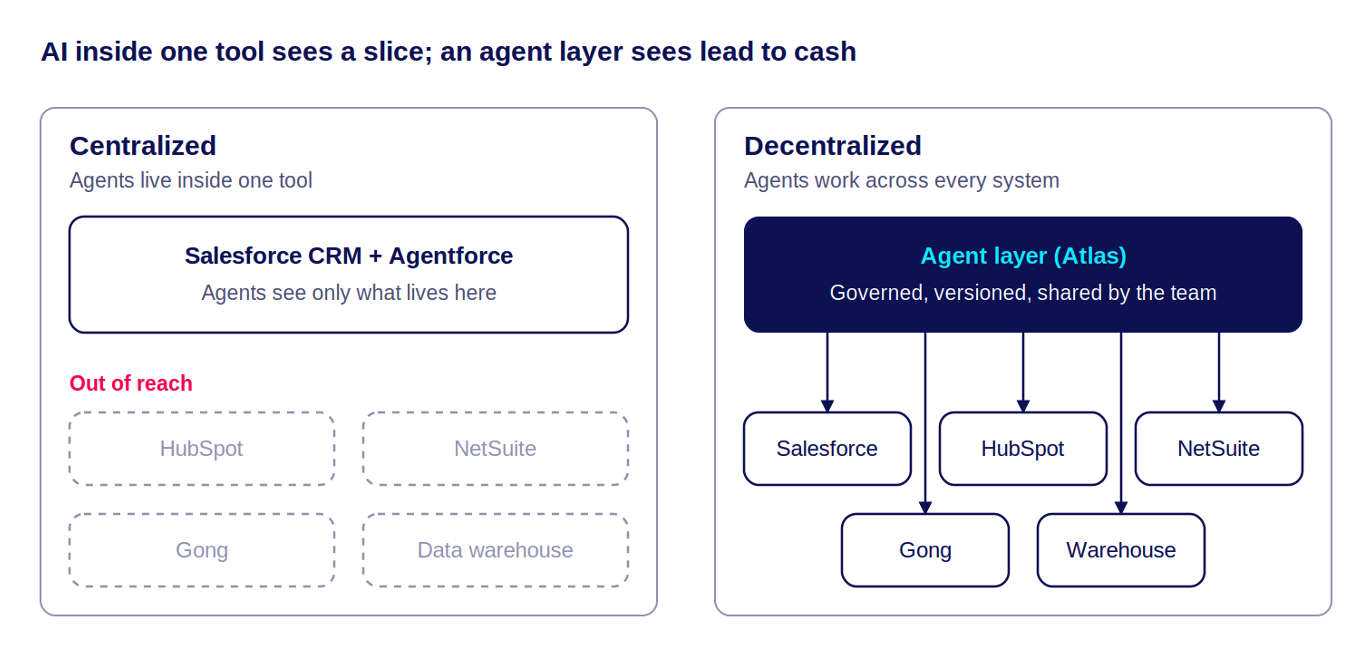
Left side: the agent is stuck with whatever one tool can see. Right side: it sees the full lead to cash picture, whether or not each tool has AI built in.
The right side is where the money is. I haven’t seen the big platforms deliver it, and I don’t expect them to because it doesn’t sell more credits.
How an Agent Layer Actually Works
An agent layer sits between your systems and your people. It doesn’t replace your CRM, your marketing automation, or your ERP. It connects to them.
Connect. The layer connects to each system through its API, like Salesforce, HubSpot, NetSuite, Gong, your warehouse, or Slack. Each connection has its own permissions, so an agent only touches the data it’s allowed to touch.
Pull context. When a task runs, the agent pulls what it needs from every relevant system, not just the one where the task started.
Do the work. The agent works across the combined data. It scores the deal, flags the risk, drafts the follow-up, or routes the lead.
Deliver where the work happens. The output goes to the system or person who needs it, which could be a field updated on the Salesforce opportunity, a task in HubSpot, a message in the rep’s Slack channel, or a note on the NetSuite customer record.

The agent’s home is the layer, not any one tool. So the same agent can read from five systems and write to two others.
Here’s what that looks like for a renewal risk agent:
Pulls product usage from the warehouse, open support tickets, contract dates and invoice status from NetSuite, and the last three calls from Gong.
Scores renewal risk on every account 120 days out.
Writes the score and the reasons onto the Salesforce account.
Posts the at-risk list to the CS team’s Slack channel every Monday.
No single tool’s built-in AI can do that, because no single tool holds all that data. And when you swap a tool later, you update one connection in the layer, so the agent keeps running.
That’s what owning the house means. You decide where the data comes from, where the work shows up, and what happens when something changes.
Where this Goes: the Headless CRM
The most important thing to realize is that once an agent layer is doing the work, the CRM stops being the place people work. It becomes the place data lives.
That’s a headless CRM.
In a headless model, the database, data model, and record stay while the screens, list views, and hours reps spend clicking through them fade out. Reps get their answers in Slack and managers get the forecast in their inbox. Updates get written back to the record by agents, with a person approving the ones that matter.
Nobody rips out their CRM to get there. It happens in stages:
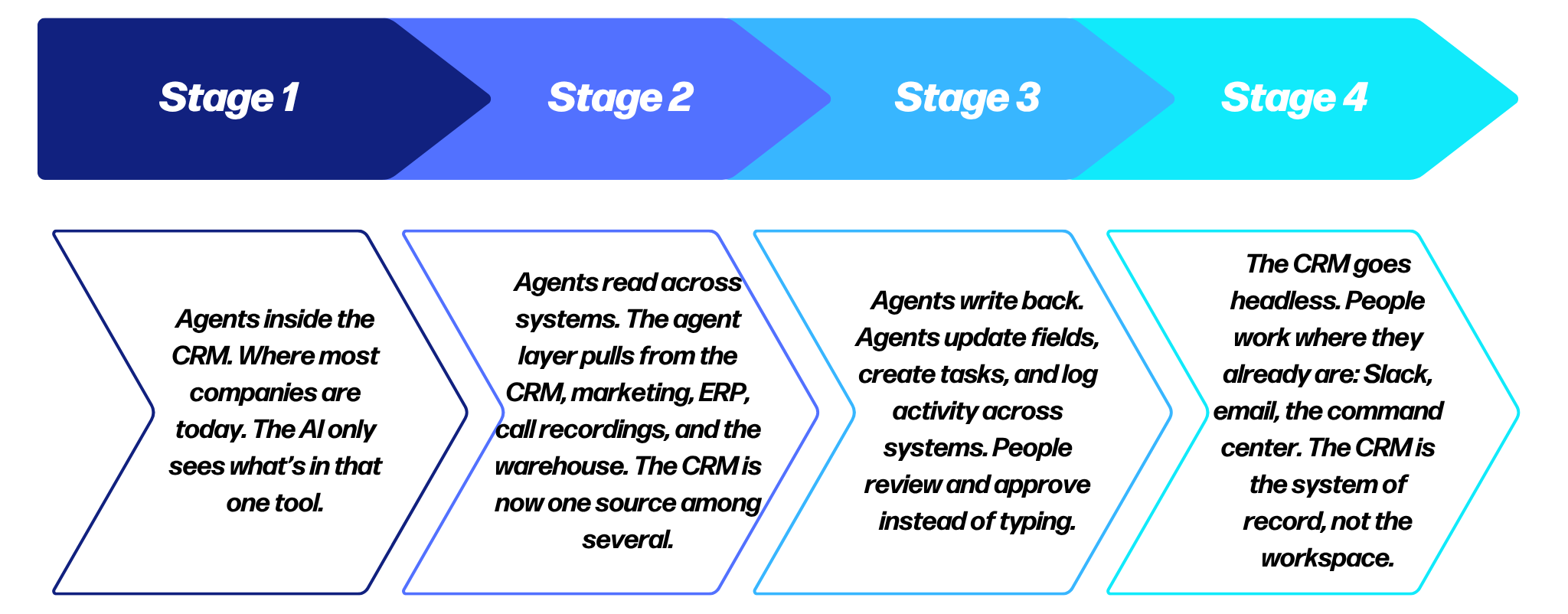
This is the path people miss. They think the choice is “keep Salesforce” or “replace Salesforce,” but in reality, it’s neither. You keep the CRM as the record and move the work to the layer above it.
It also explains why the big platforms push so hard to keep agents inside their walls. If the work moves out of the CRM screens, their hold on you moves with it.
Two things matter more in a headless model. First, your data model has to be clean, because agents trust it more than any rep ever did. Second, you need governance, because agents are now writing to your system of record.
What this Looks Like with Scaylr
Here’s how we run it at Hyperscayle with Scaylr Suite of Agents. Our agents sit under one command center, deployed inside the client’s own cloud.
The command center plays traffic cop. When a request comes in, for example a rep asks a question in Slack, a scheduled run kicks off, or a deal changes stage in Salesforce, the command center decides what happens next.
The Scaylr Command Center:
Routes the request to the right agent.
Sequences agents when a task needs more than one. The forecast agent waits on the data quality agent to clean up the account before it scores the deal.
Enforces permissions, so each agent only reads and writes the systems it’s cleared for.
Prevents collisions, so two agents aren’t updating the same record at the same time.
Logs every action, so you can see what each agent did, when, and why.
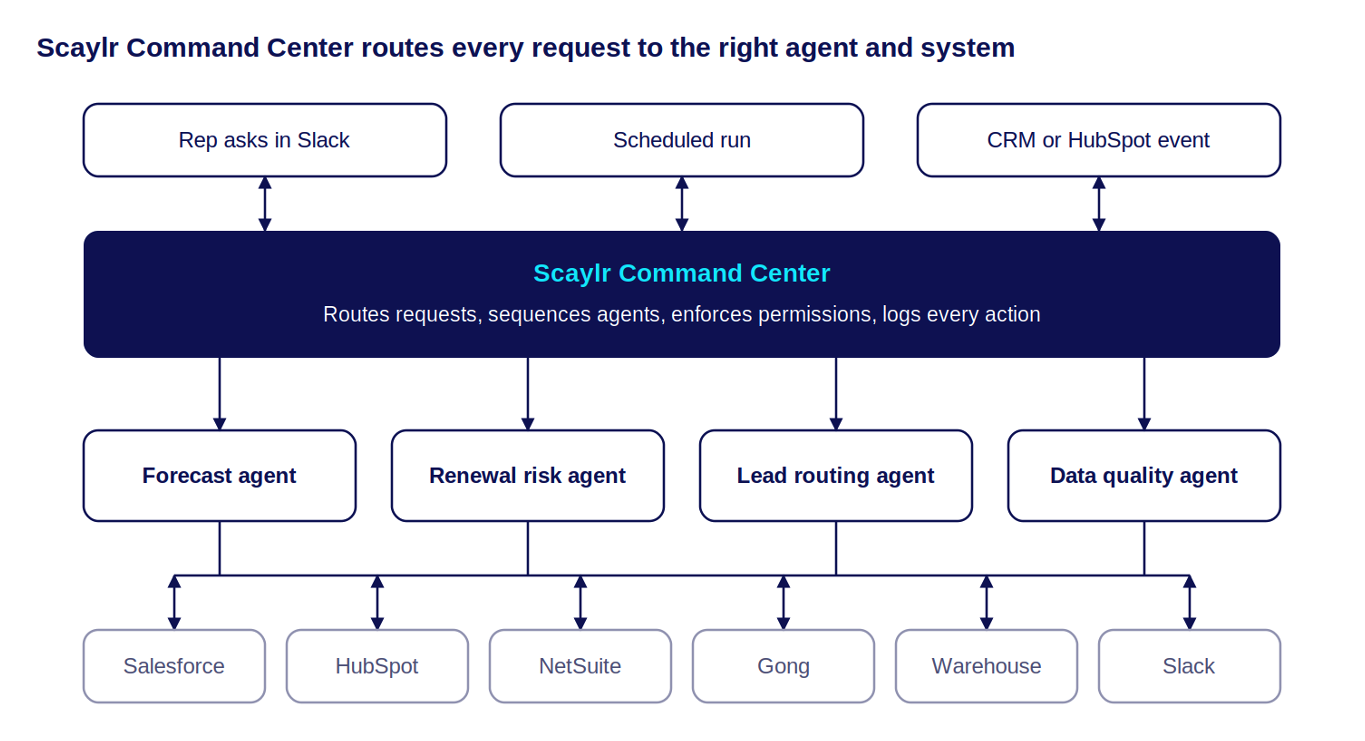
The agents don’t hold the answers, but they go get them. Each agent goes back to the connected systems (Salesforce, HubSpot, NetSuite, Gong, the warehouse), pulls what the task needs, and sends the result back where the work happens. The command center tracks every step.
That’s the agent layer in practice: one place to see every agent, what it did, and how it’s configured.
Even the “Easy” RevOps Agent Hits a Wall
Take the most common ask we get: a pipeline health or forecast agent. Point it at the CRM, have it flag the deals at risk, go to lunch.
Someone always says “everything should be in the CRM.” Should be. Isn’t. Here’s what you actually find when you go looking:
Activities and stages are in the CRM. Great start.
Gong call insights are there only if someone piped them back. Usually they didn’t, or one summary field made the trip.
Product usage and intent signals live in your platform or your warehouse. Outside the CRM.
Marketing engagement on the account lives in HubSpot. Outside the CRM.
Billing and contract history lives in NetSuite. Outside the CRM.
So the forecast agent sees stage changes and logged activity and that’s it. It can’t tell you the champion went quiet on the last two calls, product usage dropped last month, the account stopped engaging with marketing, or the last invoice is 60 days past due.
Those are the signals that actually predict a slipped deal. Without them, you get the same pipeline report you already had.
I’ve watched this happen more times than I can count. Teams can’t get a simple agent out the door because nobody mapped where the data lives before they started. They hit a dead end, rebuild and then hit another one.
Build vs. Buy is the Wrong First Question when it Comes to AI in RevOps
Build vs. buy comes up in almost every AI conversation we have. Most teams pick build (probably because they’ve seen peers boasting about inflated AI use cases on LinkedIn or the board told them to “figure out AI”) so somebody wires up a script a few API calls, and a model. It works and everybody high-fives.
But then life happens when a field moves, a new system shows up, and the agent needs to run on a schedule (not on Kyle’s laptop.) Maybe another team wants in, so now the scope is three times bigger, and the thing you built gets bulldozed and started over.
The problem is building without a foundation that fits your environment. Agents that start as one-off scripts don’t hold up once you add scheduling, permissions, more data sources, or more teams.
That’s where Atlas earns its spot. It manages all your AI agents in one place and runs a decentralized architecture, so agents work across your systems whether a tool has AI baked in or not. You stop pouring new concrete every time the scope grows.
Nobody is Doing Governance Well (Nobody)
This is the part everyone skips. Once you have more than a couple of agents, you need governance including who owns it, and what data it can touch. Someone needs to own what changed last Tuesday and why the numbers look different today.
I haven’t seen one company do this well yet. Most agents live on one person’s laptop. It’s the RevOps version of running the company forecast out of somebody’s personal Excel file on their laptop, so when that person quits, switches teams, or goes to Cabo for a week, the agent goes with them.
Atlas fixes this too. Agents live in one place, under version control, and multiple people can edit them. You see what changed, you can roll it back, and the team can actually maintain what it built. This makes it a system you can run a business on.
Stuck with AI in RevOps? This is Probably Why.
If you’re trying to figure out where AI fits in your revenue engine and Agentforce keeps hitting walls, or you can’t get anything past the build phase, stop buying tools for a minute. Look at the architecture.
Answer three questions before you build or buy anything:
Where does the data this agent needs actually live?
Can the agent reach all of it, or just what’s inside one tool?
Who owns, maintains, and changes this agent six months from now?
If you can’t answer, your agent won’t survive contact with the real world. Get the foundation right and AI becomes a force multiplier across marketing, sales, and finance. Skip it and you’ll be rebuilding the same agent next quarter. And the one after that.
If you’re interested in learning more about Scaylr Suite of Agents, watch the live demo or book a call with us.
About Hyperscayle
Hyperscayle is a revenue operations consulting and implementation firm. We partner with growth-stage and enterprise organizations to help them build, optimize, and scale their RevOps systems — including Marketo, Salesforce, HubSpot, and the full marketing automation ecosystem.
We provide both strategy and execution for your RevOps projects, designing business process and technical solutions, then putting hands on keyboards to implement them in your marketing, sales and finance systems. We’ve solved RevOps challenges across multiple industries, with a focus on SaaS, Manufacturing, Finance and Healthcare.